This section describes the Disable Widget functionality in HIL
SCADA
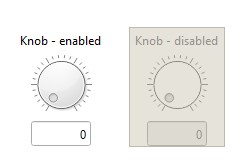
HIL SCADA allows individual widgets to be disabled. Each disabled widget will be visually
marked within the UI to clearly indicate its disabled state (Figure 1).
When a widget is disabled, the following behavior applies:
Signals associated with the widget (analog, digital, streaming, etc.) will not be
collected.
Widget handlers and macros will not be executed.
Local name-space resolution will not be performed (applicable to group-like
widgets).
Some user interaction with the widget will not be possible (e.g., selecting UI
controls on the widget).
However, even when a widget is disabled, certain interactions remain available, including
moving, resizing, copy/cut/paste operations, as well as modifying parameters within the
Property dialog. Figure 1. Disabled widget state
Note: Disabling a group-like widget (Group or Sub-Panel
widget) will disable all of its child widgets. The same applies to the enable
operation - enabling a group-like widget will enable all of its child
widgets
Note: A widget can only be enabled if its parent
widget is also enabled.
Disabling/Enabling a Widget
There are multiple ways to disable or enable a widget in HIL SCADA - using the SCADA
UI or the SCADA API.
Disabling/Enabling a Widget via SCADA UI
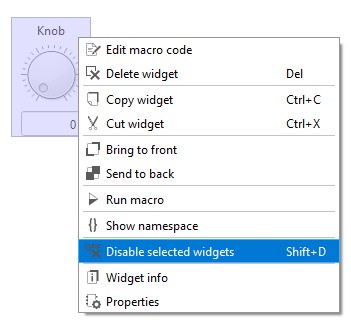
Context menu: Select the desired widget, right-click to open
the context menu, and choose the Disable selected widgets or
Enable selected widgets action (Figure 2).Figure 2. Disable/Enable widget from context menu
Keyboard shortcuts: When widget is selected, use the following
shortcuts:
Shift+D - Disable the widget
Shift+E - Enable the widget
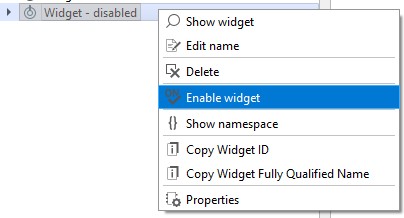
Panel Explorer: (Panel Explorer Dock) To
disable or enable a widget using the Panel Explorer, right-click the widget name and
select the Disable widget or Enable
widget action from the context menu (Figure 3).Figure 3. Disable/Enable widget from Panel Explorer context menu
Disabling/Enabling a Widget via SCADA API
In addition to the SCADA UI, widgets can be disabled or enabled programmatically via
the SCADA API using the set_property_value() function with the new
PROP_ENABLED property.