0 votes
71 views
ago in Hardware by Genís Joan Romano (12 points)

Good afternoon,

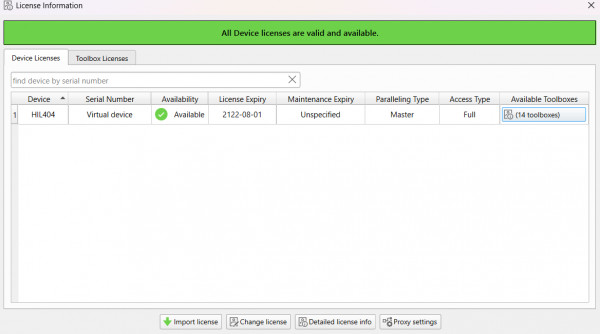
A few months ago, I requested acces to the typhoon software in order to start a university project. The request was approved and I was provided with a license, that I activated as you can see in the second attached picture. 


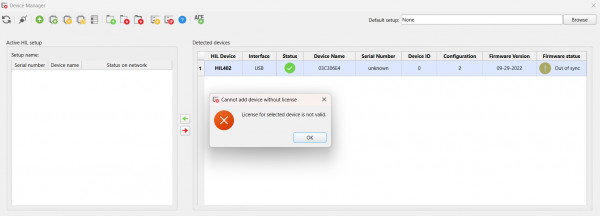
My university (Universitat Rovira i Virgili) has an available HIL 402 (details as the serial number provided)  that, as you can see in the first attached picture, is detected by my pc but when I try to add the device to my setup, it clearly says that the license for selected device is not valid.

I'm not sure wether the problem is my license (given that iI got the free one and with my license I only can select 404 as the device) or the device's license. I'd really appreciate any kind of help on that matter. I would also like to know if the firmware can properly be updated (if it would still be compatible with the new version off typhoon center one) given that the current one is quite old (09-29-2022). 

I can perfectly run my simulations in the schematics editor and the scada but I'd like to know if I would be able to run it on the HIL402 in order to get some physical feedback to an extern device. 

Thank you very much for your help, it is truly kindly appreciated. 

Salutations,

Genis Joan Romano
1 Answer

0 votes
ago by Era Bajpai (337 points)

Hi Genis Joan Romano,

Let me try to help you here.
The license key which you received for HIL404 as per the second attached screenshot is invalid for real-time execution as it is just a virtual key(not meant for real-time, can only run simulation in software virtually).

However, the device license key for HIL402 which you have available is something different. You must contact the concerned person who has purchased the HIL402 device and they will share the hardware device key with you. Once you receive the key for HIL402 device, open Typhoon HIL software, go to the license option and at the bottom of the pop-up screen you can see change license option(attached picture 1- red block). Once you click there, you can insert the new alpha-numeric license key and restart the software.

After restart, you will be able to see HIL402 in the license window and then your hardware connection will be formed from device manager.

Regarding firmware, once the device is connected, just click on the sync firmware option on the device manager window and your firmware will be automatically synchronized with your current software version(attached picture 2- red block).

Hope this helps.

Era Bajpai

Welcome to the Typhoon HIL user forum. Please check self-service support resources before posting a question.

HIL Specialist 2.0 courses
Documentation
Knowledgebase (Legacy)
Video support on demand
Youtube tutorials

For subscription-based support visit Typhoon HIL Support Center
...